tadg.ie
Home Poetry Artwork Blog Tech Snips Plays
Watch Youtube with Auto-Translated Captions

Watch Youtube with Auto-Translated Captions

Taḋg Paul · 8 Jun 2025

Instructions for Subtitles in English

How to get English (or any other language!) subtitles auto-generated while watching a video in another language

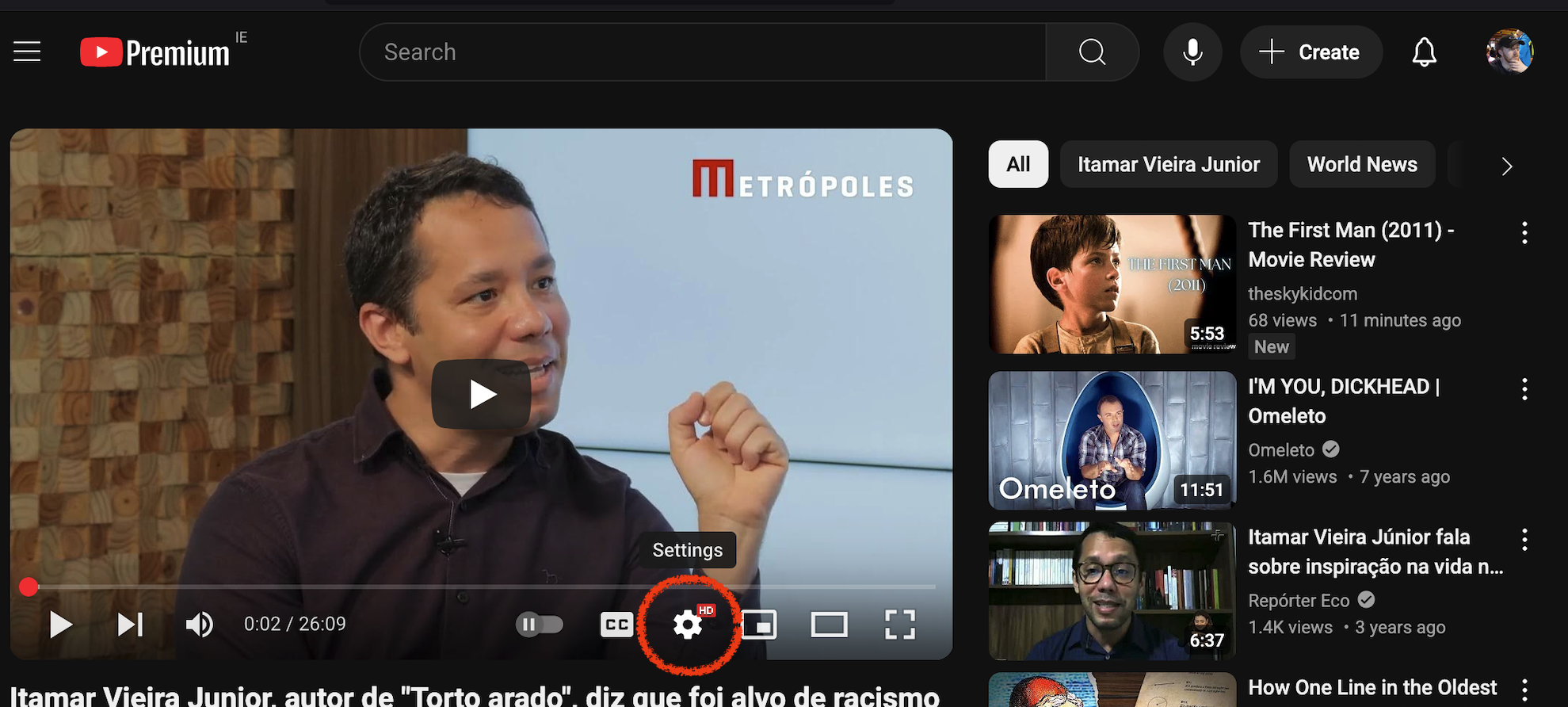
On the Youtube video you'll see a little button that looks like a "gear" with cogs, something you might see if you opened up an old wrist watch :)

youtube-captions-translate-01.png

Click this, then choose Subtitles:

youtube-captions-translate-02.png

Here you can see three options, click Auto-Translate:

youtube-captions-translate-03.png

Now you will have to scroll down to find English … or whatever your preferred language is! Danish is in there, even Irish!

youtube-captions-translate-04.png

Now we have lovely subtitles to help us enjoy the interview in full:

youtube-captions-translate-05.png

  • tech

Related articles

  • Image manipulation from the command line tech-snips
  • Bulk delete bookmarks in Microsoft Word tech-snips
  • Firefox: disable autofill in forms tech-snips
  • Filtering and searching in hledger tech-snips
  • Auto-Deploy Hugo from Github tech-snips
© Taḋg Paul